start here
hashcat and common wordlists come preinstalled in Kali.
You will have to unzip the rockyou wordlist first...
it is in the /usr/share/wordlist directory, and you can also get to it from the kali file explorer
For hashcat, you'll need to know what hash type you are trying to crack, and what kind of attack you want to run.
To Run:
1 - put your hashes in a plaint text file, one hash per line
2 - run hashcat, passing the options you want to use
Basic syntax
$ hashcat -a <attack-mode> -m <hash-type> <hashfile> <wordlist_or_mask_or_rule> -o <file>
-a= attack mode (e.g.0= wordlist,3= mask/bruteforce etc).-m= hash type (numeric ID from hashcat example_hashes).-o= name of file to save cracked hashes in
Example: (wordlist attack on md5 hashes using rockyou wordlist, saving to myCracks.txt):
hashcat -a 0 -m 0 myHashes.txt /usr/share/wordlists/rockyou.txt -o myCracks.txt
the help file for hashcat hashcat --help has examples and lots of details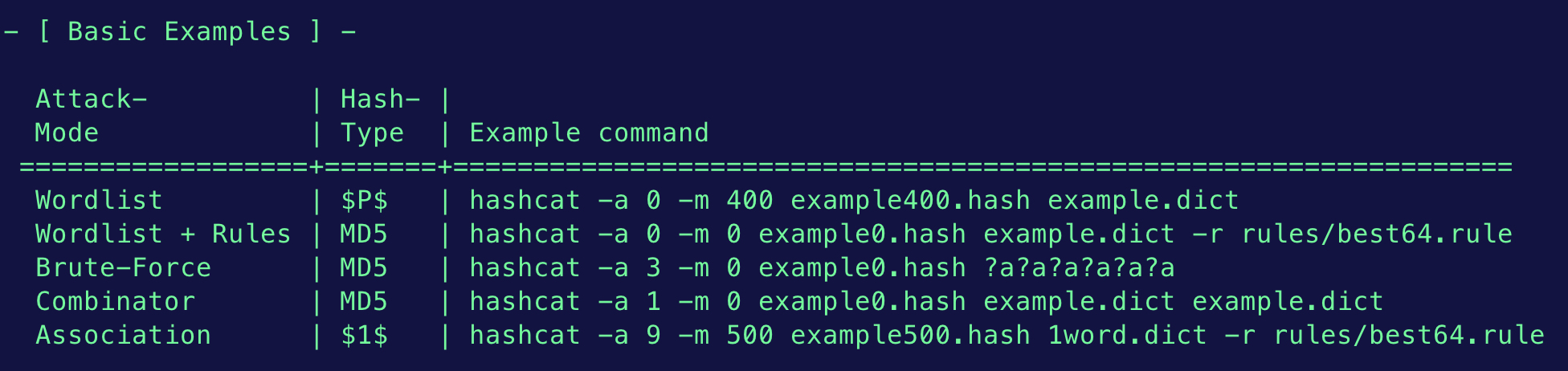
Attack Modes
- Dictionary attack - trying all words in a list; also called “straight” mode (attack mode 0,
-a 0) - Combinator attack - concatenating words from multiple wordlists (
-a 1) - Mask attack - trying all characters from given charsets, per position (
-a 3) - Hybrid attack - combining wordlists+masks (
-a 6) and masks+wordlists (-a 7); can also be done with rules - Association attack - use an username, a filename, a hint, or any other pieces of information which could have had an influence in the password generation to attack one specific hash (
-a 9)
Mask Attacks / Bruteforce
MASK attack - passwords that are in a specific format-a 3 = mask attack (attack mode 3)
hashcat will test passwords created on the fly based on the character placeholders you specify:
mask attack examples:
hashcat -a 3 -m 0 hashes.txt 'SKY-KAIT-?d?d?d?d'
# md5 attack when passwords are in the format 'SKY-KAIT-nnnn' where each n is a digit

hashcat -m 0 -a 3 hashes.txt '?u?l?l?l?d?s'
# md5 attack when passwords are in the format uppercase_letter, followed by 3 lowercase letters and then a digits and a special character
Hashcat built-in charsets:
?l = lowercase letters (a-z)
?u = uppercase letters (A-Z)
?d = digits (0-9)
?s = special characters (!@#$%^&* etc.)
?a = all printable ASCII characters (combination of ?l?u?d?s)
?b = all bytes (0x00-0xff)
HYBRID attack
-a 6 : attack mode 6
a hybrid attack applies a mask attack to a wordlist:
hashcat -m 0 -a 6 myHashes.txt wordlist.txt ?d?d
?d appends a digit to each word in the wordlist
Rules based attacks
Advanced techniques
Hashcat Optimization:
Tips for getting better and faster with hashcat:
Password Cracking for NCL Primer, by DiGi, the password wizard
other useful options
-O - optimize kernel: no by default, may add speed but limits password length to 15-w - default 2, workload, GPU utilization ( 1-4 ), okay to use 4